6x4 vs A4 shipping labels: which should a UK seller use?
17 October 2026 · 4 min read
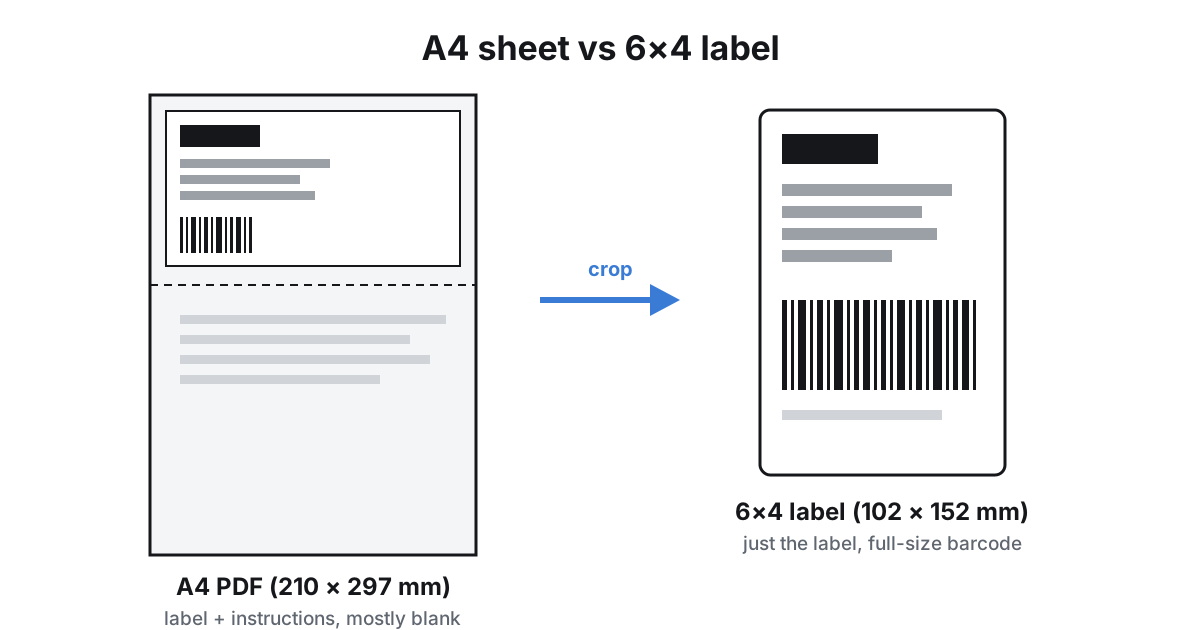
If you sell on Vinted, eBay or Etsy, every parcel needs a label, and you'll quickly hit a choice: print on ordinary A4 paper, or buy a thermal printer and use 6×4 sticky labels. Both work. Which suits you comes down to how many parcels you send and how much faff you're willing to put up with.
What "6×4" actually means
A 6×4 label is 4 × 6 inches, roughly 102 × 152 mm. In the US it's usually called 4×6, in the UK more often 6×4, but it's the same size. It's the standard size for parcel labels and what most home thermal label printers take.
A4 is your normal printer paper (210 × 297 mm). Most marketplaces and couriers give you your label as an A4 PDF, because everyone can print that. The label itself usually takes up only part of the page, with instructions, a despatch note or white space filling the rest.
Printing on A4 paper
Good for: occasional sellers, a few parcels a week, anyone who already has an inkjet or laser printer.
- No extra kit. Print the PDF at 100% size, cut out the label and tape it on, or slide it into a plastic label wallet.
- Ink or toner cost. A label with large black barcodes uses more ink than a page of text, and inkjet cartridges add up.
- Tape matters. Don't tape over the barcode or QR code with shiny tape. Glare can stop it scanning. Tape around the edges instead.
- Sticky A4 label sheets (full-page or split into 2 or 4) save the cutting and taping. They work well if your courier's PDF lines up with them.
Printing on 6×4 thermal labels
Good for: regular sellers, anyone posting most days, people tired of scissors and tape.
- No ink at all. Direct thermal printers use heat-sensitive labels that darken where the print head heats them. You only buy labels.
- Peel and stick. Each label comes off a roll or fanfold stack already sticky, so there's no cutting or taping.
- Upfront cost. You'll need a thermal printer and a supply of 6×4 labels. Look for one that supports 4-inch-wide labels (102 mm), the parcel standard.
- The catch: most labels arrive as A4. Print an A4 PDF straight to a 6×4 printer and it gets squashed onto the small label. The barcode ends up tiny, or the label is cut off.
Which couriers support which?
It varies by courier and by where you bought postage, so check the label options each time you buy postage:
- Royal Mail Click & Drop lets you choose the label format in its settings: A4 (with 1, 2 or 4 labels per page, or an integrated label and despatch note), 6×4, or 4×3 for thermal printers.
- Marketplace labels (for example from Vinted) are often supplied as an A4 PDF. Some couriers ask that labels are printed at their original size on white A4 paper, so read the instructions that come with the label.
- QR-code drop-off is offered by some couriers and marketplaces: you show a code at a ParcelShop or locker and they print the label for you. If that's offered, you may not need to print anything.
Getting either one to scan
- Print at 100% / "actual size". Never "fit to page" or "shrink to fit". Scaling changes the barcode size.
- Keep the whole barcode visible, with a bit of white space around it, and flat on the parcel, not wrapped around a corner.
- Check the first label before printing a batch: is the address readable, and is the barcode crisp, not faded or smudged?
- For thermal printers, set the paper size in the printer settings to 4 × 6 in (or 102 × 152 mm). A wrong paper size causes most "prints too small" problems.
Turning A4 labels into 6×4
If you have a thermal printer but your labels arrive as A4, you need to crop the label out of the page onto a 6×4 page before printing. You can do it by hand in a PDF editor. Or drop the PDF into Label Cropper: it finds the label automatically (including several labels on one sheet) and gives you a PDF that's exactly 6×4, with nothing uploaded. There are step-by-step guides for Vinted, Evri and Royal Mail labels.
The short answer
| A4 paper | 6×4 thermal | |
|---|---|---|
| Up-front cost | None if you have a printer | Printer + labels |
| Ongoing cost | Ink/toner, paper, tape | Labels only |
| Time per parcel | Print, cut, tape | Print, peel, stick |
| Best for | A few parcels a week | Regular sellers |
Selling now and then? Stick with A4 and a plastic label wallet. Posting most days? A thermal printer usually pays for itself in time saved, as long as you have a quick way to get your labels to 6×4.
Sources
- Royal Mail Click & Drop: Choosing your label format
- Royal Mail Click & Drop: What label size should I be using?
- InPost: I'm shipping on Vinted, do I need to print a label?
Label Cropper is an independent tool and isn't affiliated with Royal Mail, InPost, Vinted, eBay or Etsy.